PARTNER CORE · PRODUCT PASSPORTS

Know the product
behind the experience.

A Product Passport keeps the product, formulation, batch and available label or chemistry information together, with a record of where each detail came from.

On this page

THE RECORD IN PRACTICE

Product identity, with the details behind it.

A useful record answers ordinary questions: which product, which formulation, which batch, and what supports those details?

Keeping those details together gives partners and app users a consistent reference for the product being discussed or observed.

Source information and review status stay with each detail. When information is missing, the record makes that gap visible.

PRODUCT RECORD · FIELD GUIDE

Inside a Product Passport

Brand & product
Maker + product nameIdentify the specific product in the catalog.
Formulation & format
Contents + form + unitsKeep ingredients and declared amounts with their serving or percentage basis.
Batch / lot
The production batchDistinguish batches sold under the same product name.
Source references
Labels + laboratory reportsKeep each detail connected to the material that supports it.
Record status
Review + publication stateDistinguish the review of individual fields from publication of the record.

Completeness describes available fields; it is not certification. Publication does not verify every field or establish a product effect.

Explore a filled example: Aurora Meadow · batch DEMO-CS-001

CULTIVAR SIGNALS · DEMONSTRATION RECORD

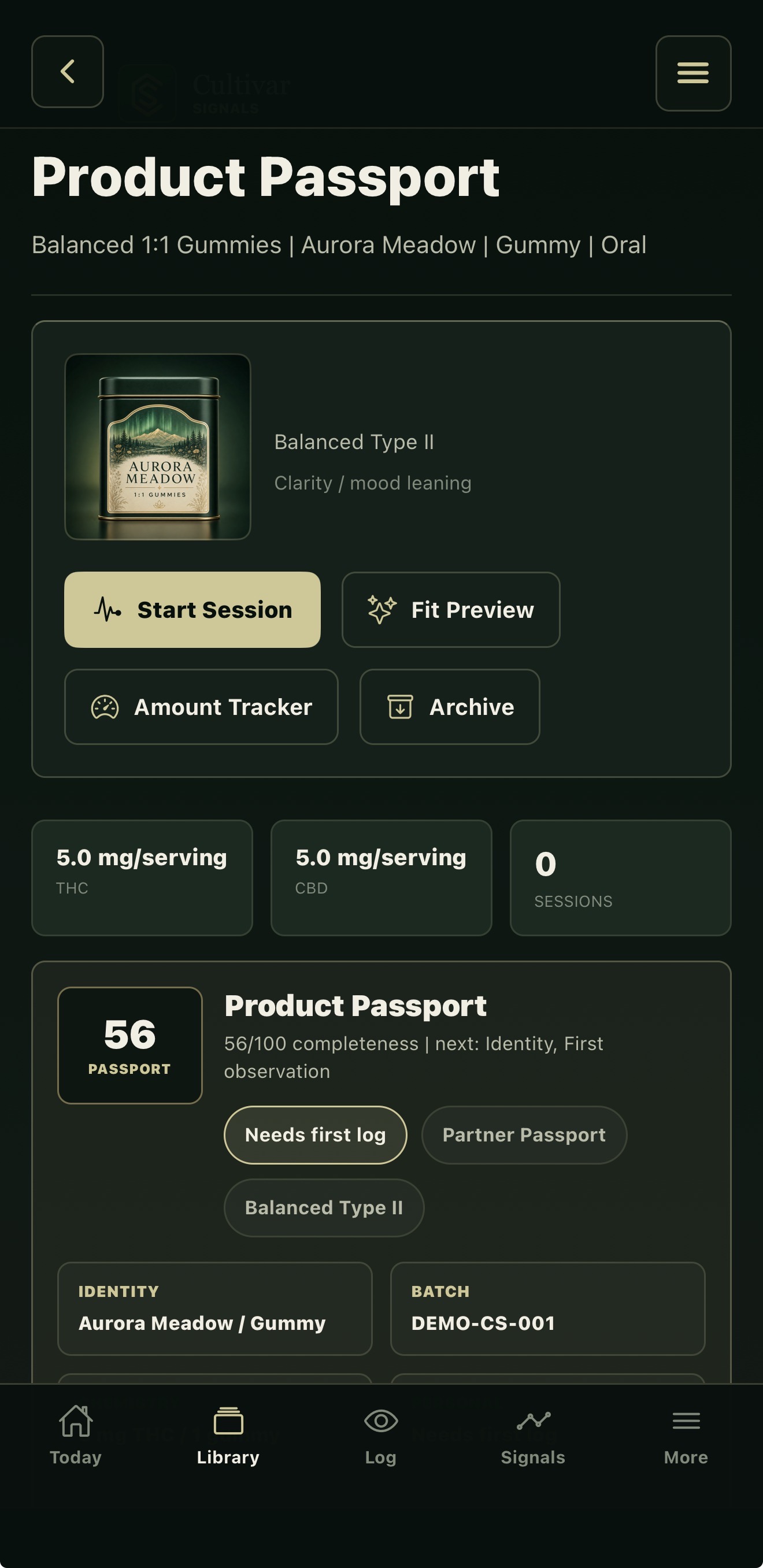
Identity and completeness remain separate.

Product
Aurora Meadow — Balanced 1:1 Gummies.
Batch
DEMO-CS-001 ties the record to this demonstration batch.
Declared units
The screen records THC and CBD in mg per serving. A value should always retain its unit and basis.
Record status
56/100 completeness and “Needs first log.” The sample is partly populated; completeness does not establish verification.

This is a supplied app demonstration, not a product offered by Continuum or evidence of a reviewed laboratory report. The visible amounts are record details, not a recommendation.

Aurora Meadow demonstration Product Passport with product identity, declared units, batch DEMO-CS-001, zero sessions and 56 of 100 completeness.
A populated sample, with its incomplete status visible.

WHO MANAGES THE RECORD

Partners maintain their catalog.
Continuum governs the shared system.

Your organization

Maintain the catalog

  1. Maintain product identity

    Create or import records. Resolve missing product, formulation and batch information.

  2. Provide source material

    Supply label and lab-report evidence. Keep source information with the record.

  3. Submit changes

    Submit updates for review. Keep drafts separate from published Passports.

Continuum

Govern the shared system

  1. Set structure and access

    Manage the common record structure, organization access and product matching.

  2. Apply review rules

    Support source review, duplicate resolution and required approvals.

  3. Control publication and corrections

    Apply publication rules. Preserve corrections, retirement and audit history.

PUBLISHED PRODUCT PASSPORT

A shared record, with its source and status intact.

A published record can be available through a public link or QR code, under the applicable review and publication rules.

Partner-supplied, document-derived and reviewed values retain their distinct status. Private source files require separate approval for public display.

Partner Core is free for approved organizations. Onboarding confirms the available catalog and publication workflows for your team.

When product information changes

Partners submit the updated information and sources. Continuum applies review and publication rules, retaining corrections, retirement and audit history. An unpublished draft stays distinct from the public record.

HOW THE APPS USE PRODUCT IDENTITY

The same product reference.
Different kinds of observation.

SHARED PRODUCT IDENTITY

A consistent reference for what was used.

SIGNALARC

Products in a routine

Product records give pathways and personal observations a consistent reference for what was used. With permission, selected Cultivar Signals Passport information can continue into SignalArc.

Explore SignalArc

CULTIVAR SIGNALS

Details behind a session

Available label, chemistry, formulation and batch details stay with the product record, helping people review cannabis experiences with more context than a product name alone.

Explore Cultivar Signals

DIGESTION SIGNALS

Scoped programs

Context for digestive programs

Digestion Signals organizes meals and digestive observations. In a scoped product-focused cohort, a Passport can identify the product being studied while the program defines which digestive measures are collected.

Explore Digestion Signals

A product record is not a personal history.

Publishing a Passport does not share anyone’s observations with a partner. App connections and cohort participation require their own choices and permissions. A meal log is not automatically a Passport, and the apps do not automatically synchronize all records.

Direct product-reference and linking workflows vary by app and supported build.

YOUR NEXT STEP

Make your product information easier to use.

Partner Core is free for approved organizations. Controlled onboarding confirms the catalog and publication workflows available to your team.